Dragging a card into Finder gets you a copy you hope is good. AutoOffload copies your SD and CFexpress cards with a checksum on every single file, then builds your folders and renames each shot by capture time as it copies — so every shoot lands provably safe and delivery-ready, and your card is never touched.

Tell AutoOffload how you like a shoot organized — once. Every offload after that sorts by capture time, drops each photo and clip into the right folder, and renames it your way — automatically, while it copies. No Finder cleanup. No dragging. No 1 a.m. renaming after a twelve-hour wedding.
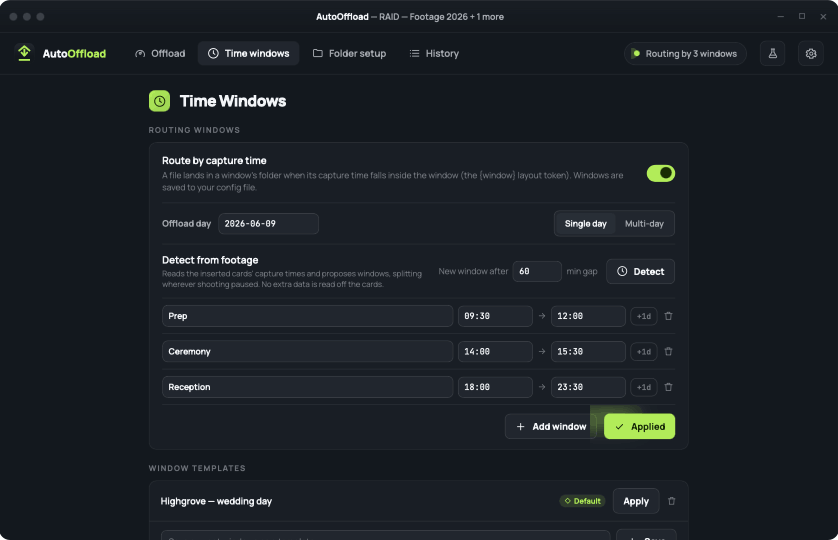
Name your windows once — “Getting Ready,” “Ceremony,” “Reception,” or one per listing — and every shot, from every card and camera, lands in the right folder by capture time. Overnight and multi-day events handled.
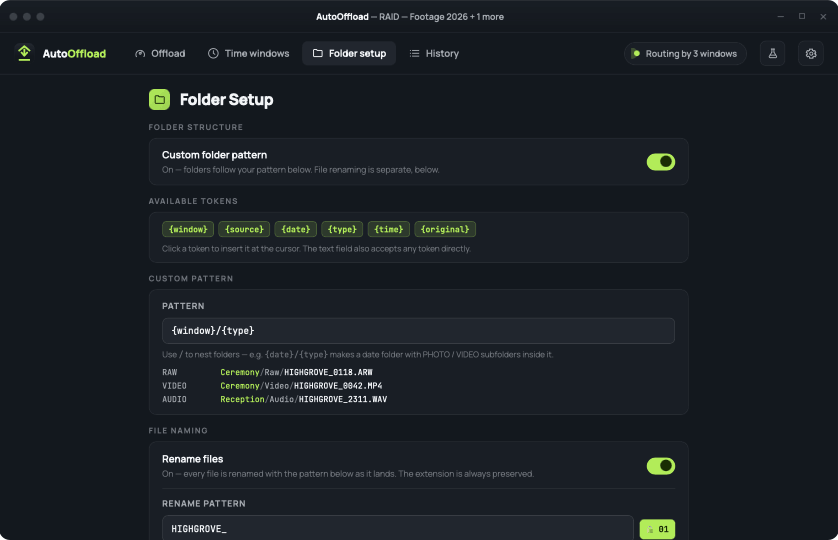
Build your folder tree and filenames from tokens — date, type, sequence — and watch the live preview update as you type. A wedding, or a full day of listings — every still and clip in the run is named your way, consistently. The Finder rename pass is gone for good.
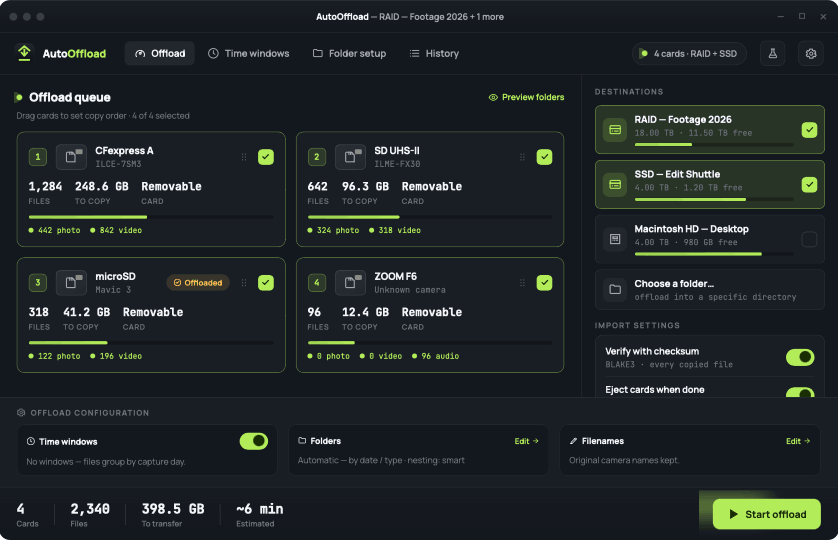
Drop in all your cards and copy to a working drive and a backup at the same time. Each file is read off the card just once, then verified — so it's faster, and gentler on cards you can't replace mid-shoot.
Copy speed is the easy part — Finder does that. The hard part, and the part AutoOffload is built for, is proving the files that leave your card are identical to what was on it, and making sure nothing it does can ever harm the original.
A write-protection layer refuses any write that resolves onto removable media — even through symlinks. Your card is never modified, renamed, or deleted from.
Each file is re-read after copying and its 256-bit BLAKE3 hash compared against the source. A mismatch deletes the bad copy and flags the file — so a corrupt copy never hides among the good ones.
Files are written to a temp name and renamed into place only after copy and verify succeed. A power loss, force-quit, or pulled card never leaves a half-file pretending to be real.
One pass does the backup and the busywork. Then re-verify months later, with the same engine watching your back.
Every card is detected automatically, with file counts by type, total size, and the camera identified from the images themselves.
All cards copy at once — to a working drive and backup together — and each shot files into your folders, renamed, as it lands. Each file is read off the card just once.
Every copy is re-read and BLAKE3-compared against the source. A per-file audit manifest and a shareable HTML report land right alongside your files.
Point AutoOffload at the archive any time and it re-hashes every file against the stored manifest — catching bit-rot or a flaky drive before it bites.
Verifying once at copy proves a file was written correctly — but drives develop bit-rot and corruption months later, long after the copy is done. AutoOffload writes a manifest you can re-check forever, so you can prove a finished archive is still perfect — not just hope it is.
The failure modes that wreck a delivery — full disks, duplicate filenames, half-copied files — are designed out by default, with no extra clicks.
Files already copied are recognized by hash — not filename — and skipped. Re-running an interrupted offload copies only what's missing, instantly.
Two cameras both shooting DSC0001? Detected and resolved by numbering — never overwritten, never lost, even across many cards at once.
Every destination is checked for room before a single byte copies — so an offload never strands you with a half-full drive at the worst moment.
A per-file CSV manifest and a clean, shareable HTML report land beside the photos — proof for a client or your own peace of mind. Tuck it away or turn it off.
Cards auto-eject only after a fully verified, failure-free run. Anything less is reported file-by-file, and the cards stay safely mounted.
No account, no cloud, no network at runtime, no telemetry. Everything runs on your machine, and your clients' photos never leave it.
Download AutoOffload and run your first five offloads free — full verification and organization, no account. When you're ready, it's a flat $79 — one payment, yours forever.
A Mac app for photographers that copies photos and video off SD and CFexpress cards, verifies every file with a BLAKE3 checksum, and automatically organizes each shoot into folders by capture time as it copies.
macOS only, for now — Apple Silicon and Intel, macOS 11 or later, as a direct download. On Windows? Leave your email to test the Windows beta.
No — AutoOffload runs fully offline, with no account and no telemetry. The only time it goes online is a one-time license activation.
Never. A write-protection layer blocks any write to removable media, so your card is only ever read — never changed, renamed, or deleted from.
Every copied file is re-read and compared to the source with a 256-bit BLAKE3 checksum, and a saved manifest lets you re-verify the archive months later.
Your first five offloads are free. After that it's a one-time $79 purchase — no subscription, and it's yours forever.
Email [email protected] — bug reports and support questions both reach us directly, and we'll get back to you. AutoOffload sends no telemetry, so a quick note from you is the best way to flag something.
More questions? Read the documentation — Quick Start, Safe Use, Troubleshooting & the full FAQ.
Download AutoOffload free and run your first five offloads on us.
AutoOffload is a Mac app. If you shoot on Windows, leave your email if you'd like to be contacted to test the beta Windows version.